All rules for Songs
On this page
Draft+ entries
Rule 1: Source non-obvious
Include sources for non-obvious additions or changes. Edits by verified artists are considered authoritative information and do not need to be further sourced.
(Applies to all entries)
Rule 2: No incorrect information
Do not add incorrect information.
(Applies to all entries)
Rule 3: No information removal
Do not remove information in a way that’s not in line with the content removal guidelines.
Clearly incorrect information and out-of-scope entries can usually be removed, however it is typically best to make an entry report first.
(Applies to all entries)
Rule 4: No duplicate entries
Do not create duplicate entries, unless for separating artist personas.
(Applies to all entries)
Rule 5: No duplicate information
Do not duplicate information between fields or different entries.
Some data duplication is allowed if there are significant upsides in usability.
(Applies to all entries)
Rule 6: Use correct fields
Use the correct entry fields when adding information. For example, do not put lyrics in the entry description.
(Applies to all entries)
Rule 7: Name required
All entries require a name.
If all the primary names are whitespace, add the Untitled tag.
(Applies to all entries)
Rule 10: No WIPs
Demo and work in progress (WIP) songs/albums should not be added, unless:
- The song is part of a valid album entry
- The song is a voicebank demo
- The song is in its finalized form due to external circumstances (i.e. death of the creator)
Teasers that are different from the actual songs that they promote are allowed (example).
(Applies to all song & album entries)
Rule 11: No AI-generated songs
Do not create song entries for AI-generated songs, such as those generated with Suno.
(Applies to all song entries)
Rule 12: No out-of-scope song entries
Songs without voice-synth vocals (Vocaloid/UTAU/CeVIO/etc.) should not be added, unless:
- The song is part of an album entry.
- The song has at least 5 voice-synth covers (these can be added as cover unifier entries).
(Applies to all song entries)
Rule 13: No song entries by forbidden artists
Song entries where the main producer is listed under forbidden artists should not be added.
(Applies to all song & artist entries)
Rule 14: Song source required
Song entries require a PV or an external link or an attached album entry for proof of existence. A description may be set instead if the only applicable links are direct downloads or profile-less file sharing sites.
(Applies to all song entries)
Rule 16: No mobile links
Some websites have a separate URL for pages meant to be viewed on mobile:
Always prefer adding the desktop version of the link.
(Applies to all entries)
Rule 17: No download links
Direct download links (on any field) to media files (such as .mp3 or .flac) and links to file-hosting services (such as Google Drive or Dropbox) are not allowed, even if they’re legal. If the content is officially distributed, link the artist’s page (e.g., on Piapro or a blog) instead.
File sharing website links are only allowed if the website supports user profile pages, and the user (uploader) page is directly navigable from the download link page (https://piapro.jp/ links for example). In other cases the download link location should be mentioned in the entry description instead.
(Applies to all entries)
Rule 18: No email links
Do not add email links.
(Applies to all entries)
Rule 19: No tracking links
When adding external links, remove extraneous URL elements (usually after ? or &). More on #1765.
(Applies to all entries)
Rule 20: Correct link category
Use the correct link category.
Link categories are available for the main entry types (songs, albums and artists).
Official= Links to content that the artist can directly control.Commercial= Official links that include commercial features (such as album/song purchase).Reference= Unofficial reference, such as wiki article.Other= Other unofficial and useful links that do not directly reference the entry.
(Applies to all song & album & artist entries)
Rule 22: No objective tag votes
Adding tag votes to objective tags is redundant, unless there is a need to highlight the tag.
(Applies to all entries)
Rule 30: No machine translations
Do not add machine translated/romanized titles or lyrics.
(Applies to all entries)
Rule 31: Valid translation
Translations should be correct. Do not attempt to translate if you do not know the language well enough.
Official translations are accepted in any case.
(Applies to all entries)
Rule 33: Japanese whitespace
Separate all words and particles with spaces when romanizing.
(Applies to all entries)
Rule 34: Chinese whitespace
For Pinyin, separate each character with a space when romanizing.
Special names and proper nouns are kept together.
(Applies to all entries)
Rule 35: Romanization capitalization
Capitalize all words that are NOT single kana particles (は、が、を、etc).
- E.g. 歌に形はないけれど would be romanized as ‘Uta ni Katachi wa Nai Keredo’.
(Applies to all entries)
Rule 36: No macrons for long vowels
Do not use macrons for long vowels.
- こおり is romanized as ‘koori’, not ‘kōri’.
(Applies to all entries)
Rule 37: Apostrophe after ん
If ん is followed by a vowel (including や・ゆ・よ), romanize it as n’.
- E.g. してやんよ would be romanized as “Shiteyan’yo’”.
(Applies to all entries)
Rule 38: Romanization は
は (ha) is romanized as ‘wa’ if it is used after a noun as a topic marker.
- E.g. 恋は戦争 would be romanized as ‘Koi wa Sensou’, the は is not part of a word and functions as a particle.
(Applies to all entries)
Rule 39: Romanization づ
づ is romanized as ‘dzu’.
(Applies to all entries)
Rule 40: Romanization を
を (wo) is romanized as ‘o’ if it is used after a noun as a direct object particle.
- E.g. 地球最後の告白を would be romanized as ‘Chikyuu Saigo no Kokuhaku o’.
(Applies to all entries)
Rule 41: Romanization へ
へ (he) is romanized as ‘e’ if it is used after the name of a place to indicate direction as a particle.
- E.g. 駆ける、星空の彼方へ would be romanized as ‘Kakeru, Hoshizora no Kanata e’, the へ is not part of a word and functions as a particle.
(Applies to all entries)
Rule 42: Identical name order
Use the same order as the original Japanese name for romanizations.
Usually this is “Lastname Firstname”.
(Applies to all entries)
Rule 43: Loanword romanization
Loanwords are romanized into their original language (e.g. コーヒー → coffee)
(Applies to all entries)
Rule 44: Honorific suffix dash
Use a dash with honorific suffixes on names when romanizing.
- お姉さん would be romanized as ‘Onee-san’.
(Applies to all entries)
Rule 45: Fully loanword names
Do not add the romanization if the entire name is composed of loanwords.
(Applies to all entries)
Rule 46: No AI-assisted audio transcriptions
AI-assisted tools are not allowed for audio transcription, as they are extremely inaccurate with languages like Japanese and Chinese and even more so with Vocaloid.
(Applies to all entries)
Rule 66: Artist credit required
All album and song entries require at least one artist credit (custom or a proper entry).
- Use the entry Unknown producer(s) if necessary.
(Applies to all song & album & artist entries)
Rule 72: No forbidden artists
Do not add artist entries for forbidden artists.
Additionally, do not add song or album entries for forbidden artists if they are the main producer.
(Applies to all artist & song & album entries)
Rule 73: No unconsented unofficial voicebanks
Artist entries for voicebanks created through any of the following methods are not allowed:
- The use of unlicensed, leaked, or otherwise illicitly obtained development kits
- Generated from existing voices without explicit consent from the author or appropriate terms of use.
Song credits should be added with the “custom artist” feature along with the unofficial voicebank/Jinriki tag. It is possible to further specify the methods used by tagging the song with the relevant child of the imported voicebank tag or with the VOCALOID V3 Developer Kit tag.
For example, a voicebank made with the VOCALOID V3 Developer Kit would fall under the first case, and most RVC models (besides those that have consent) would fall under the second. Note that some voicebanks, for example, Adachi Rei, have permissive licenses that freely allow for derivative creation, so consent is already granted.
(Applies to all song & artist entries)
Tag the artist with the secondary artist types when appropriate.
For example, if an Animation producer (artist type) is responsible for the lyrics (as a role), the artist entry should be tagged with the lyricist tag.
(Applies to all song & artist entries)
Rule 94: Respect the do-not-reprint tag
If the main artist or song is tagged with do not reupload, do not add any reprint links to their songs. This rule also applies to unofficial uploads of partial or non-primary audio (such as instrumentals) in a page’s external links.
(Applies to all song entries)
Rule 98: No redundant events
If the event is added on the album, do not add the same event on the album songs/tracks.
(Applies to all song & album & event entries)
Rule 117: Remaster entry reuse
If the original is replaced by the remaster, it’s unnecessary to create a separate entry for the original if the original audio is unavailable and the remaster is uploaded within a month. The remaster can use the “original song” type.
(Applies to all song entries)
Rule 120: Low-effort Music PVs
New Music PV entries should not be created for unofficial low-effort PVs. These can be added as Other PVs to the original entry instead, if the song length matches.
(Applies to all song entries)
Rule 124: Other song type classification
The “Other” song type is used for album tracks or voicebank demos that do not belong to any other song type.
(Applies to all song & album entries)
Rule 129: Most relevant original version
If multiple original versions apply, choose the most relevant entry and mention the rest in the entry description.
Entry tree structure should be immutable and sorted by publish dates.
(Applies to all song entries)
Rule 130: Cover unifiers
If the out-of-scope original version has 5 or more derived song entries (such as remixes or covers) on VocaDB, it can be created as a cover unifier song entry.
Cover unifier artists who are out-of-scope should be credited as “custom artists” (= no entry). The Temporary artist entry can be used to bypass the creation form.
(Applies to all song entries)
Rule 133: Correct PV type
Rule 135: No premieres
Song entries should not be created based on unpublished YouTube premieres.
- Adding links that have not yet premiered to existing song entries is fine, as long as the song entry has some other playable link.
(Applies to all song entries)
Rule 136: Region-blocked
Do not mark region-blocked PVs as “Unavailable”, unless the PV is region blocked everywhere.
(Applies to all song entries)
Rule 138: Source lyrics
Always leave a source for the lyrics; sources should provide a link to an originating source and / or mention the name of the translator. If transcribed, translated, or transliterated by yourself, you should source your own name and provide a relevant link (such as your VocaDB user profile).
If the lyric source is missing, locate it before modifying the lyrics. See a list of websites where to look for lyrics. If the source can’t be found, create an entry report for the missing source and use a credit like “Unknown (fixed by user2)”.
(Applies to all song entries)
Rule 145: Unconfirmed vocalists tag
When crediting a derived voicebank based on hearing, Hatsune Miku Append (Soft) for example, tag the entry with “unconfirmed vocalists” or document the source in the edit notes.
(Applies to all song entries)
Rule 161: Original PV classification
Original PVs are authorized content uploaded by a party with rights to both audio and video.
(Applies to all song entries)
Rule 162: Original PV deletion
If an original PV is unavailable, mark it as unavailable instead of removing the link.
(Applies to all song entries)
Rule 163: Reprint PV classification
Reprint PVs are copies of the original from another service by a party unrelated to the original artist.
(Applies to all song entries)
Rule 164: Other PV classification
Other PVs are subtitled PVs or modified PVs that don’t justify a new entry.
(Applies to all song entries)
Rule 174: No sensitive personal information
Sensitive personal information should not be shared in entries or user profiles.
(Applies to all entries)
Rule 175: Official romanizations are valid
Official romanizations do not need to follow VocaDB’s romanization guidelines.
In this case the official romanization tag is required.
(Applies to all entries)
Rule 176: Faint vocals
For original songs with faint vocals that are almost fully instrumental, use the faint vocals tag.
(Applies to all song entries)
Rule 178: Unofficial out-of-scope music PVs
Unofficial music PVs with only out-of-scope characters are allowed if the video has at least 100k views.
(Applies to all song entries)
Rule 179: Respect the no-lyrics-allowed tag
If the main artist or song is tagged with no lyrics allowed, do not add any lyrics to their songs.
(Applies to all song & artist entries)
Finished+ entries
Rule 8: No name duplication
Missing names should not be copied between other name fields.
(Applies to all finished entries)
Rule 23: Valid description
The description should be objective and neutral.
(Applies to all finished entries)
Rule 24: Original language required
The original language field for entry names should not be “unspecified”.
(Applies to all finished entries)
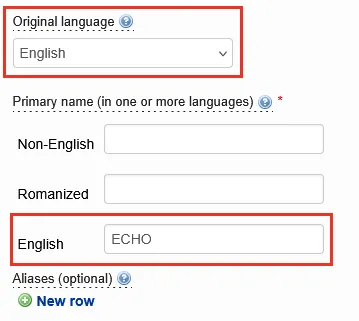

The ‘Original language’ title field should be filled in the corresponding ‘Primary name’ title field; the former should not be Unspecified, and the latter should not be empty (unless tagged with untitled).
For example, the song ECHO has its ‘Original language’ title field set to English, while its English ‘Primary name’ title field contains its proper title and is thus not empty.
An example showing the name field of the entry https://vocadb.net/S/68814:
Another example showing the name field of the entry https://vocadb.net/S/916132:
(Applies to all finished entries)
Rule 26: Prioritize official translations
Prioritize official translations/romanizations even if it is lesser known or breaks VocaDB romanization guidelines.
(Applies to all finished entries)
Rule 27: Correct entry subtype required
Entry subtype must be specified for album, artist & song entries.
(Applies to all finished song & album & artist entries)
Rule 28: Merge correctly
Merge lower-status entries into higher-status ones, or newer entries into older ones.
(Applies to all finished entries)
Rule 29: No new non-English translations
New non-English title translations should not be added without a good reason.
For example, the song entry ECHO should not receive new name/title translations.
Acceptable exceptions:
- Translation is used somewhere elsewhere (add for improved searchability).
- Translation is related to the original name (additional context/value). For example, マトリョシカ is from the Russian word “Матрёшка”, but is also known by its Romanized form “Matryoshka”.
(Applies to all finished entries)
Rule 57: Custom tracks
The “custom track” feature (no song entry) should only be used for out-of-scope tracks made by out-of-scope artists. Secret Sky 2020 (DJ Mix) for example.
(Applies to all finished song & album & artist entries)
Rule 59: Content tags
Content-based artist/album tags should only be used if a sizable portion of the album/artist’s songs are tagged.
A parent tag can also be used if the song entries are tagged with more specific child tags.
(Applies to all finished song & album & artist entries)
Rule 62: Valid support status
Support status is for crediting artists who play a minor role compared to the main artists in the same role. It should only be used when there’s a clear separation of main and support artists. If there is only one artist in a certain role, the support status should never be used.
Valid examples:
- Backing vocals, e.g., a background chorus when the main vocals are sung by another vocalist.
- Background illustrators (to distinguish them from the main illustrator).
Support status can’t currently be specified to a specific artist role. For example, if a song composer is also responsible for the background image, the support status should not be used.
Effects of support status:
-
Support status removes the artist(s) from the artist string and affects the search through the “Only main songs” filter.
-
Artists with support status never appear in the “artist string” of the song/album.
-
Support artists are shown in parentheses and after all other artists.
(Applies to all finished song & album & artist entries)
Rule 67: Producer entry credits required
Artist credits in the “producer” category must be made with artist entries.
- If the name of the producer is unknown, use the entry Unknown producer(s).
(Applies to all finished song & album entries)
Rule 81: Correct artist type
Artist type specifies the most common role that the artist participates in, with some overrides.
- Music producer overrides cover artist if they have at least one composed/arranged song entry.
- Verified artists can request changing the chosen artist type.
The available artist roles are limited and serve as approximations. - For example, the person responsible for the song image should be credited with the “illustrator” role, even if it’s technically something else (e.g., photographer).
(Applies to all finished song & artist entries)
Rule 100: Publish date required
Song entries should include the earliest public publish date:
- Video streaming services such as NicoNicoDouga and YouTube.
- Distributing the song on a physical album at a record store or event.
- Digital album on a marketplace such as iTunes, Spotify, Apple Music, etc..
Private distribution does not count. Work in progress versions also do not count.
If the song is deleted and then reuploaded, the publish date does not change. It’s still the date when the song was first made public.
If the field is empty, the publish date is automatically suggested based on the album and PV links.
(Applies to all finished song entries)
Rule 101: Clean title
Only include the title of the song as the entry name (with exceptions on “Remix” and “Remaster” entries)
(Applies to all finished song entries)
Rule 102: Keep remix titles
Remix entries should keep the long title.
For example: Plug Out (HSP 2012 Remix)
- Remove clear non-title parts (e.g., original artist credit).
- Remove the vocalist’s name if it is separate from the rest of the title.
- Remove the song type if it is separate from the rest of the title.
The same applies for Remaster songs.
(Applies to all finished song entries)
Rule 103: Valid BPM
The specified BPM should be within the valid range (20-1050).
(Applies to all finished song entries)
Rule 104: No video descriptions
Video descriptions should not be added in the description field.
(Applies to all finished song entries)
Rule 105: Specify original
Derived songs should either:
- Specify the
Original versionfield. - Refer as an external link to the original entry on UtaiteDB or TouhouDB, if applicable. This will display it as the “Original version” along with automatic metadata.
- Include the human original or instrumental original tag.
- Include the original version unknown tag.
(Applies to all finished song entries)
Rule 106: Specify out-of-scope original
If the human original tag or the instrumental original tag is included, the original version should be:
- specified in the song description AND/OR
- included as an external link (required for UtaiteDB originals).
(Applies to all finished song entries)
Rule 107: Matching song language
Song language should match the language of the original lyrics.
(Applies to all finished song entries)
Rule 108: Specify multiple song types
If multiple song types apply, add them as tags.
(Applies to all finished song entries)
Rule 109: Original song classification
The “Original song” song type is used for songs that have completely original content and aren’t based on other songs.
(Applies to all finished song entries)
Rule 110: Instrumental tag
Use the “instrumental” tag for original songs without vocals.
(Applies to all finished song entries)
Rule 111: No vocalists if instrumental
Exclude vocalist credits for off-vocal/karaoke songs that have background/harmony vocals, as these are already credited in the original entry.
(Applies to all finished song entries)
Rule 112: Remix classification
The “Remix” song type is used for variants of a song, often in a different genre.
(Applies to all finished song & artist entries)
Rule 113: Live versions as remixes
Entries tagged with live recording should use the remix song type.
(Applies to all finished song entries)
Rule 114: Extended versions as remixes
Entries tagged with extended version should use the remix song type.
(Applies to all finished song entries)
Rule 115: Cover classification
The “Cover” song type is used for re-recorded versions of a song.
(Applies to all finished song & artist entries)
Rule 116: Remaster classification
The “Remaster” song type is used for songs that only differ from the original only in terms of mastering
(Applies to all finished song entries)
Rule 118: Music PV classification
The “Music PV” song type is used for remarkable music videos of a song.
(Applies to all finished song entries)
Rule 119: Music PV entry reuse
If a song entry lacks a video, then the first official video should be added to the main entry unless said video is of a different length or noticeably changes the audio.
Anything posted onto BiliBili, YouTube, NicoNicoDouga, or a similar website counts as being a “video”, unless said upload is auto-generated, is a pitch-black screen, or is directly attached to the Vocaloid Anonymous Uploading Festival. Conversely, anything posted to an audio-only site counts as lacking a video.
(Applies to all finished song & album entries)
Rule 121: Mashup classification
The “Mashup” song type is used for songs made by blending two or more songs together.
(Applies to all finished song entries)
Rule 122: Specify mashup sources
Specify all the original versions in the song description.
(Applies to all finished song entries)
Rule 123: Medley classification
A medley is a special case of mashup where songs are played one after another, possibly with overlap.
Unless the medley is an original song, use the Mashup song type.
(Applies to all finished song entries)
Rule 125: Song type priority
VocaDB song type classifications should be prioritized over official labels.
(Applies to all finished song entries)
Rule 127: Simultaneous uploads
If the (voice synth) song also has a human-sung version uploaded less than a week apart, set the song entry as an original song and tag it with “simultaneous upload”.
(Applies to all finished song entries)
Rule 128: First published as original
Original version should be the entry with the earliest publish date.
If multiple versions of a song are uploaded simultaneously, it doesn’t generally matter which is picked as the original version.
(Applies to all finished song entries)
Rule 131: Same audio
All media/PVs added in a single song entry must have the same audio and roughly the same song length.
Unrelated intros and outros are an exception to this.
(Applies to all finished song entries)
If the original artist is not directly involved with the derived version, the artist credit should not be duplicated from the original entry.
(Applies to all finished song & artist entries)
If the song has multiple producers, specify the roles if available: Composer, Arranger & Voice Manipulator.
(Applies to all finished song entries)
Rule 137: Multilingual lyrics
The general minimum criteria for marking additional languages is to count whether there are two or more full lines in the additional language.
(Applies to all finished song entries)
Rule 139: Source lyric modifications
Lyrics can be modified without creating new lyrics, as long as the modification is mentioned in the source:
- External source: “From MikuWiki” -> “From MikuWiki (edited by user2)”
(Applies to all finished song entries)
Rule 140: No significant lyric modifications
Large lyric edits require creating new lyrics.
(Applies to all finished song entries)
Rule 141: Circle crediting
Circle can be credited if credited directly OR if all the active members participate in the song.
Note that the songs by the circle/group can be searched with the “Include group members” filter.
(Applies to all finished song entries)
Rule 142: Vocalist entry credit required
Exceptions:
- Unofficial/Jinriki voicebanks should be credited as custom artists (no artist entry).
If the album/song includes in-scope vocals, and if the vocalist is uncredited, the artist entry Unknown vocalist(s) can be used.
- The entry Unknown vocal synth(s) or any of its derived artist entries can also be used to further narrow down the vocalist.
(Applies to all finished song & album & artist entries)
Rule 143: Credit earliest voicebank version
When in doubt, credit the earliest voicebank version.
- “Kamui Gakupo V4” → V4 Kamui Gakupo (Unknown)
- “Kamui Gakupo (Power)” → V3 Kamui Gakupo (Power)
(Applies to all finished artist & album & song entries)
Rule 144: Matching voicebank language
Song language should match one of the voicebank languages, unless the song is tagged with unsupported language.
(Applies to all finished artist & song entries)
Rule 146: Unspecified voicebank tag
When the vocalist sounds different from the base-version but no further guess exists, the unspecified voicebank tag can be used.
The base voicebank should be credited.
(Applies to all finished song entries)
For derived songs, credit out-of-scope original artists in the song description (example), unless an original version has been specified as a song entry (cover unifier for example).
(Applies to all finished song entries)
Rule 156: Out-of-scope arrangement
If a song-3 is derived from out-of-scope song-2, which in turn is derived from in-scope song-1, you can specify the song-1 as the original version for song-3.
- The skipped version (song-2) should be mentioned in song-3’s entry description.
- The relevant tag out-of-scope arrangement should also be added.
(Applies to all finished song entries)
Rule 157: Instrumental classification
The “Instrumental” song type is used for instrumental versions of a song available in an album (a.k.a. off-vocal/karaoke).
(Applies to all finished song entries)
Rule 159: Drama PV classification
The “Drama PV” song type is used for video stories featuring a voice synth character.
(Applies to all finished song entries)
Rule 172: Credit base voicebank
When in doubt, credit the base voicebank.
- “Hatsune Miku” → Hatsune Miku
- “Otomachi Una” → Otomachi Una (Unknown)
(Applies to all finished artist & album & song entries)
Rule 177: Self-remixes
Self-remix tag is for songs where the original artist remixed their own song.
(Applies to all finished song entries)
Rule 180: Short versions as remixes
Entries tagged with short version should use the remix song type.
(Applies to all finished song entries)
Approved entries
Rule 60: Romaji required
Approved album and song entries should include the romanized title (if applicable).
(Applies to all approved song & album entries)
Rule 61: Translation required
Approved album and song entries should include the translated title (if applicable).
(Applies to all approved song & album entries)
Rule 68: Known artist credits required
Approved album and song entries should include all the credited artists in accordance with other crediting rules.
(Applies to all approved song & album & artist entries)
Rule 99: Lyrics required
Approved song entries should include lyrics if available.
no lyrics tag can be included instead.
(Applies to all approved song entries)