VocaDB - Website FAQ
This page documents the most frequently asked questions about using the VocaDB website.
Do you have any other questions? Ask it away on the Discord server or the discussion forum.
VocaDB won’t load!
Also applies to these questions:
- I’m stuck in the Miku background and nothing appeared!
- I got hit with the Cloudflare “Internal server error”!
VocaDB can be slow sometimes due to high traffic. Ensure your internet connection is good and check back later.
Maintenance may also happen from time to time, albeit rarely. Check the status page, the Discord server, or the Twitter or Bluesky social media accounts for the status of the site.
You can also try clearing your cookies. Read the next FAQ entry for more information.
Trying to login takes me to the home page without actually logging me in!
Clear your cookies (and site data) and try again.
If this solution does not work for you, please join the Discord server and ask for help.
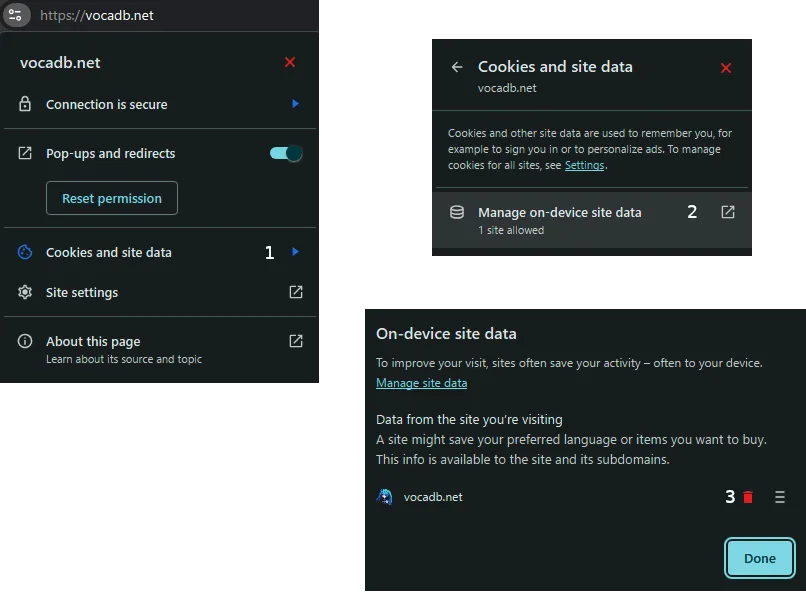
Clearing cookies on Chrome
For more information, see this Google Chrome help page
- On the VocaDB homepage, click the settings icon in the address bar.
- Click “Cookies and site data”.
- Click “Manage on-device site data”.
- Click the red trash can icon.
- Refresh the page.
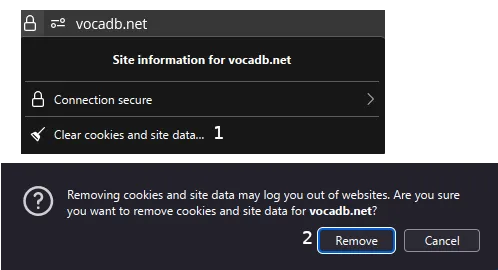
Clearing cookies on Firefox
For more information, see this Mozila Firefox help article.
- On the VocaDB homepage, click the padlock icon in the address bar.
- Click “Clear cookies and site data”.
- Press “Remove” when prompted.
- Refresh the page.
Why is this song entry in VocaDB even though it has no Vocaloid?
Songs covered by 5 song entries with vocal synthesis are allowed in VocaDB. Songs included in an album with a vocal synthesis are also allowed.
Rule 12: No out-of-scope song entries
Songs without voice-synth vocals (Vocaloid/UTAU/CeVIO/etc.) should not be added, unless:
- The song is part of an album entry.
- The song has at least 5 voice-synth covers (these can be added as cover unifier entries).
I uploaded a new image, and it doesn’t change!
This happens because of the caching happening on Cloudflare and your browser. Wait around 24 hours for the cache to expire and update the new image.
For more information, see this GitHub issue.
I don’t want my songs on VocaDB. How can I remove them?
Also applies to these questions:
- I don’t want this information that is related to my work. How can I remove them?
- This information about my song is not accurate!
See the Content removal guidelines for more information.